title: "Pelcro Platform Update 2.7 — Performance, Branding, and Admin Efficiency" description: "Release 2.7 (Tech Release 1.121)🟢 Platform: Custom CSS OverridesWe've introduced custom CSS support to the platform, allowing you to fully brand and style the default Pelcro UI without developer intervention.✅ What's New: • New Custom CSS input field available under Settings → Design • Saved CSS is persisted and applied to React Elements • Custom CSS is also returned via the site endpoint for use across integrations • Design page upgraded to the modern Preline UI🎯 Impact:You can now tailor the" slug: "pelcro-platform-update-2-7-performance-branding-and-admin-efficiency" bucket: "blog" sourceUrl: "https://www.get.pelcro.com/post/pelcro-platform-update-2-7-performance-branding-and-admin-efficiency" publishedAt: "2026-05-12T12:45:15.410Z" updatedAt: "2026-05-12T12:45:15.410Z" author: "merhan5" migratedAt: "2026-05-27T01:53:22.077Z" ogImage: "/images/blog/pelcro-platform-update-2-7-performance-branding-and-admin-efficiency/cover.avif"
Release 2.7 (Tech Release 1.121)
🟢 Platform: Custom CSS Overrides
We've introduced custom CSS support to the platform, allowing you to fully brand and style the default Pelcro UI without developer intervention.
✅ What's New:
-
New Custom CSS input field available under Settings → Design
-
Saved CSS is persisted and applied to React Elements
-
Custom CSS is also returned via the site endpoint for use across integrations
-
Design page upgraded to the modern Preline UI
🎯 Impact:
You can now tailor the visual experience of the Pelcro UI to match your brand — without workarounds or platform-level changes — making it easier to deliver a consistent, on-brand subscriber experience.
🟢 Platform: Last Login & Collaborator Export
We've added last login visibility and collaborator exports to help admins manage internal team access and meet compliance requirements with less manual effort.
-
Upgraded Collaborators page to the modern Preline template
-
New Last Login At column added to the collaborators table — sortable, ISO 8601 UTC format
-
New Export Collaborators button generates a CSV file containing:Name, email, role, last login, account creation date
🎯 Impact:
Account owners and admins can now run periodic access reviews, and meet auditor requirements without manually paginating through the UI — strengthening security posture and reducing compliance overhead.
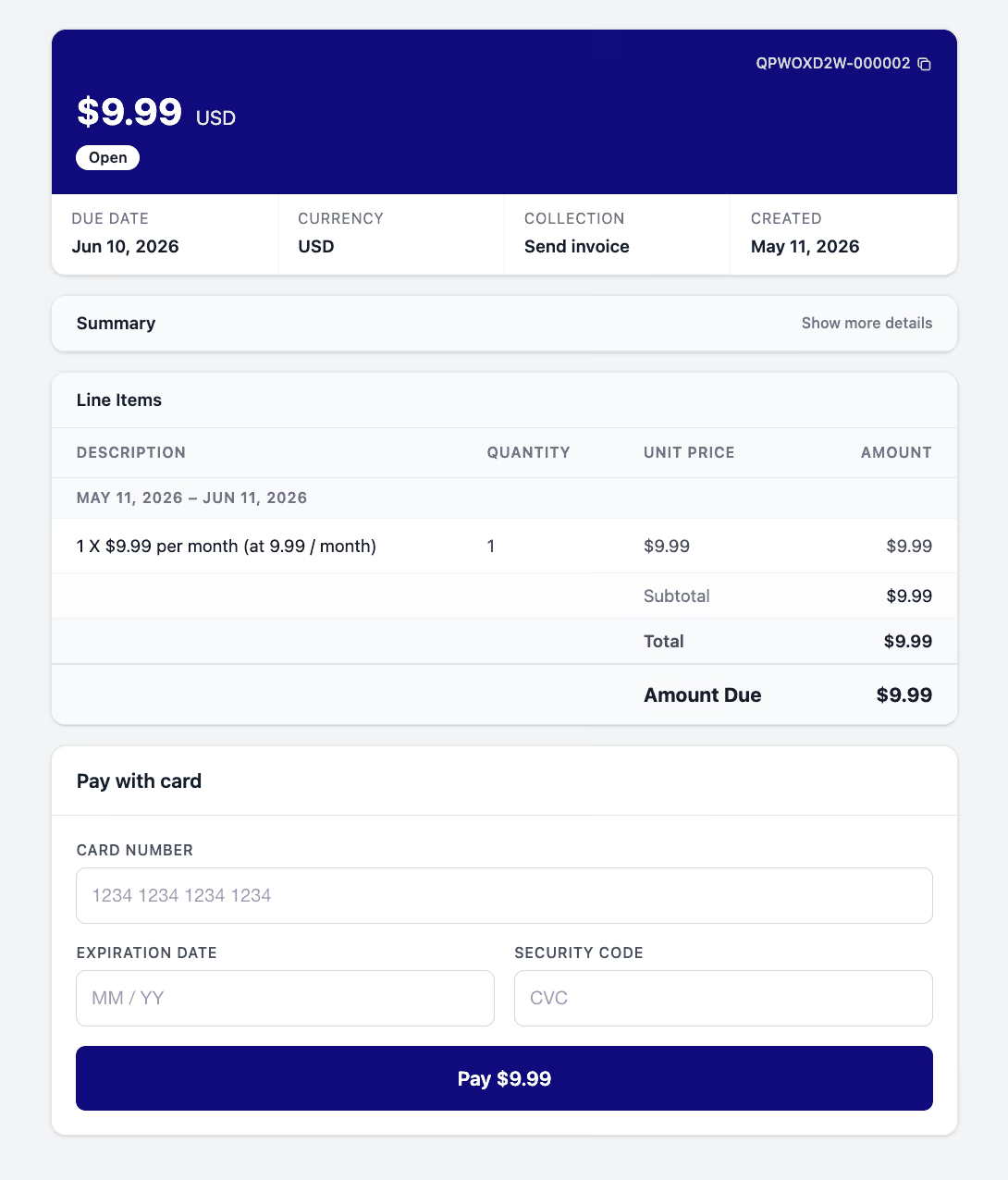
🟢 Platform: Upgraded Payment Link Page UI
We've modernized the Pelcro payment link page with a fresh, polished design that better reflects your branding.
-
Payment link page UI rebuilt using updated Preline templates
-
Your logo and primary color displayed prominently at the top of the page
-
Fully responsive across desktop and mobile
-
All existing payment functionality preserved
Customers using the payment link now experience a more professional, trustworthy checkout flow that's visually aligned with your branding — improving conversion confidence and overall polish.
🟢 Platform: Pelcro AI Agent — Background Bulk Operations
We've upgraded the AI Agent to process bulk operations in the background, eliminating connection drops and timeouts during long-running tasks.
-
Bulk operations now execute as background job batches using a dedicated queue, isolated from the main application queue
-
The chat stream stays lightweight and responsive — no more timeouts on large operations
-
Users see "Operation started" immediately, with real-time progress updates via the chat UI
-
Final results are available in conversation history — even if the user closes the chat or browser
-
Supports up to 50,000 rows / 64MB per CSV per bulk operation
-
Throttled by the account's rate limit for stability
Admins can now run large bulk imports and operations through the AI Chat Assistant without worrying about disconnections or partial completions — making the agent reliable for high-volume workflows.
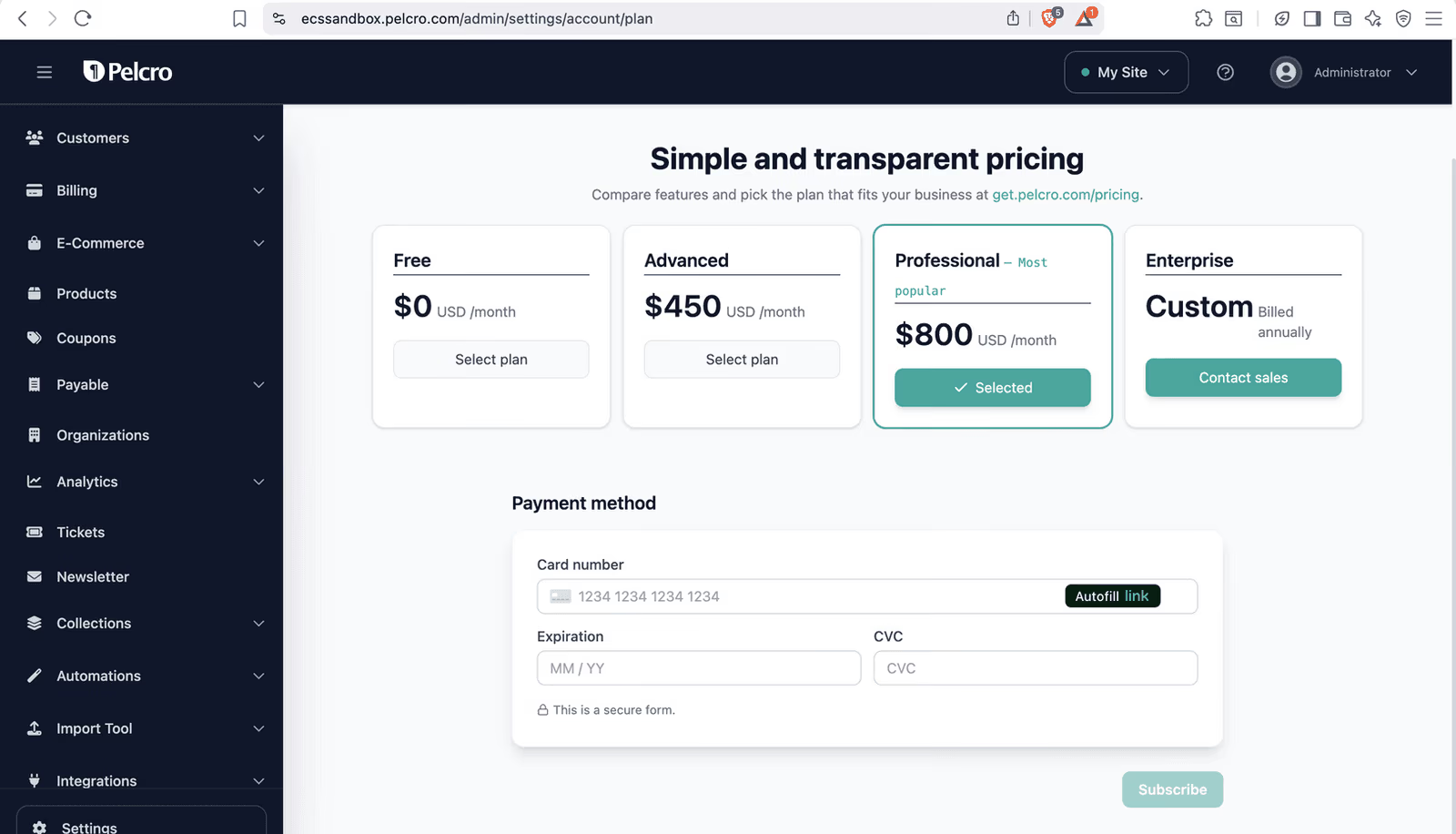
🟢 Platform: Upgraded Pelcro Plan Payment Page
We've redesigned the Pelcro plan payment page to match the modern Preline UX used across the rest of the platform, delivering a more polished checkout experience for Pelcro subscribers.
-
Payment page rebuilt using the new Preline UX template
-
Same plans, same layout, all functionality preserved — visual/UX upgrade only
Subscribers on Pelcro plans experience a checkout flow that's current, consistent, and visually aligned with the rest of the product — improving conversion confidence and overall polish.
🟢 Platform: Improved Invoice PDF Address Formatting
We've improved how billing and shipping addresses are displayed on invoice PDFs, following standard postal formatting conventions for better readability and professionalism.
✅ What's Improved:
-
Addresses now follow a clean, structured format:Full NameStreet AddressCity, State ZIP+4
-
Fixed compressed/duplicated ZIP code formatting
Invoice PDFs are now more readable, professional, and aligned with mailing standards — improving customer perception and reducing confusion when invoices are reviewed or mailed.
🟢 Platform: ZIP Code Validation for Print Plans
Admins can now restrict print subscription plans to specific ZIP codes, ensuring only users in serviceable delivery areas can purchase fulfillment-dependent products.
-
New ZIP code restriction setting available at the product level
-
Supports an array of allowed ZIP codes per product
-
Validation enforced during checkout, similar to country-based validations
-
Users outside the allowed ZIP code range see a clear message explaining that print delivery is unavailable in their area
Eliminates unfulfillable print orders by blocking ineligible users at checkout, improving operational efficiency and reducing post-purchase cancellations and customer frustration.
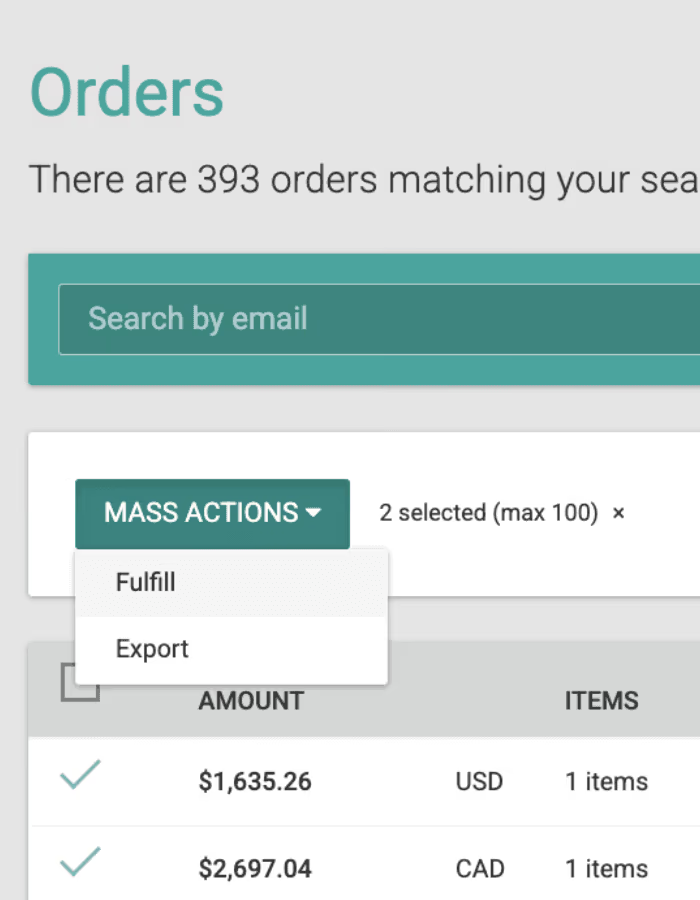
🟢 Platform: Bulk Mark Orders as Fulfilled
The Mass Action menu on the E-commerce → Orders page now supports bulk fulfillment, eliminating the need to mark orders fulfilled one at a time.
-
New "Mark as Fulfilled" option added to the Mass Action menu
-
Apply fulfillment status to multiple selected orders in a single action
-
Confirmation prompt added for irreversible actions
-
Only eligible orders are processed in the batch
Operations teams can now process large batches of orders in seconds, significantly reducing manual effort and accelerating fulfillment workflows.
🟢 Platform: PayPal Added to Payment Link Page
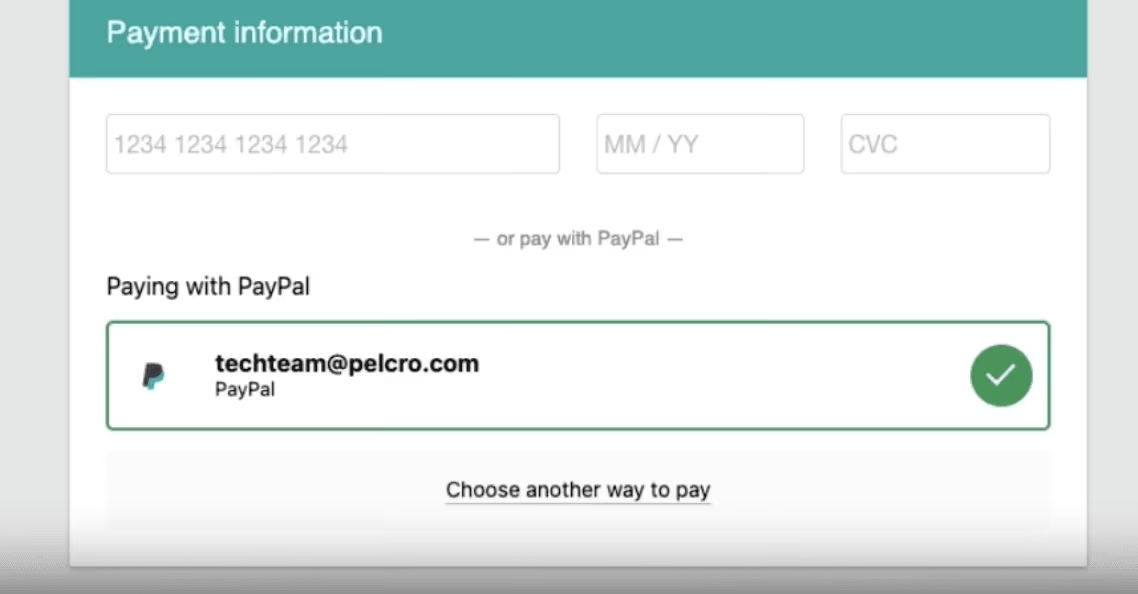
The Pelcro payment link page now supports PayPal as a payment method alongside credit cards, giving customers more flexibility and improving payment success rates.
-
PayPal is now selectable as a payment option on the portal payment page (when enabled)
-
Full PayPal flow supported: redirect, authorization, confirmation
-
Successful transactions are recorded in Pelcro
-
Failed or canceled PayPal payments are handled gracefully
-
Clear PayPal UI option displayed alongside credit card
Customers who prefer PayPal can now complete payments directly from the payment link page — increasing conversion rates and reducing payment friction for clients with PayPal-heavy audiences.
🟢 Platform: Archive Segments
Admins can now archive deprecated segments from the platform, keeping the admin UI clean and reducing clutter from outdated configurations.
-
Archive option available for segments with no active subscribers
-
Archived segments are removed from all lists and cannot be selected for new subscriptions
-
Archiving is blocked for segments linked to active subscriptions or campaigns
Admins can maintain a clean, focused segment list — making it easier to navigate the platform and reducing confusion caused by deprecated configurations.
🟢 Platform: Add Members as Active by Default (When Email Exists)
The Add Member flow has been improved to automatically activate members when their email already exists on the same site — eliminating unnecessary pending steps.
-
When adding a member whose email already exists in Pelcro on the same site, the member is added as Active automatically and linked to the existing user ID
-
When the email does not exist, the member is added as Pending (current behavior)
Members with existing accounts get immediate access without requiring a manual follow-up step, improving onboarding speed and ensuring they appear correctly in lists from day one.
🟢 Platform: Change End Date for $0 Plans
Admins can now shorten the end date of subscriptions on $0 (free) plans, enabling accurate record-keeping and retroactive corrections for free-tier accounts.
-
End date can be changed (shortened) for $0 plans
-
Available via the subscription edit view in the platform
-
Billing exports and reports reflect the updated end date
Restores parity between paid and free-tier subscription management, giving admins the ability to maintain clean historical records and accurate reporting across all account types.
🟢 Platform: Billing Information Included in Refunds Export
Finance admins can now reconcile refunds directly from the refunds export — no second report required.
-
Refunds export now includes:Billing nameBilling addressPayment method (type and last 4 digits)
-
Fields are appended to the existing export format with no columns removed
Finance teams can now reconcile refunds against original transactions in a single report, reducing manual cross-referencing and accelerating month-end close.
🟢 Platform: Donor & Recipient Info in Lists, Segments & Campaign Exports
We've expanded the data available in lists, segments, and campaign report exports to include full customer, billing, shipping, donor, and recipient information.
- New fields added to the end of list, segment, and campaign report exports:Customer: First Name, Last NameBilling: Address Line, City, State, ZIPShipping: Address Line, City, State, ZIPDonor: First Name, Last Name, Email, Address Line, City, State, ZIPRecipient: First Name, Last Name, Email, Address Line, City, State, ZIP
Marketing and operations teams can now run targeted campaigns, generate accurate reports, and manage fulfillment and donor recognition workflows without external data stitching or manual cleanup.